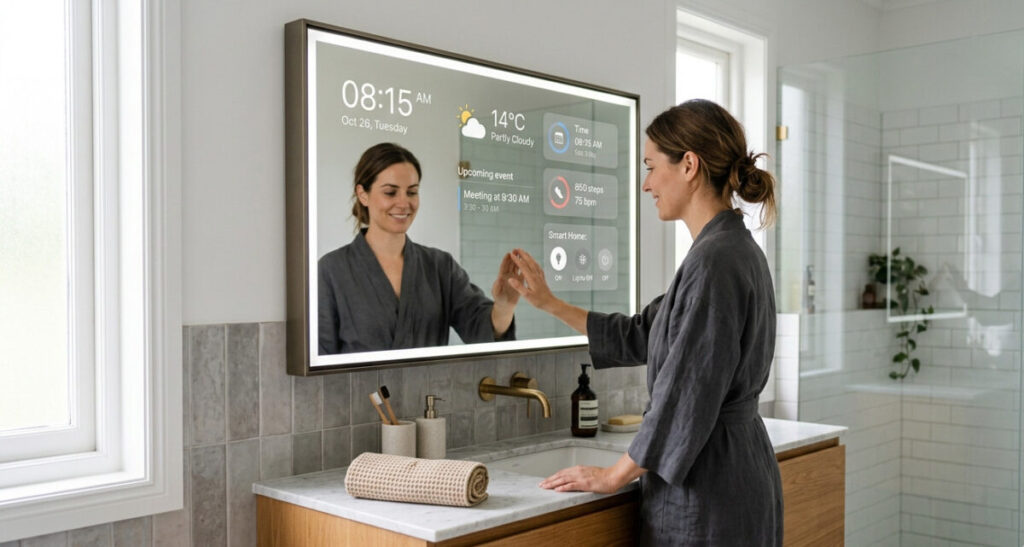

Picture your bathroom mirror showing the weather forecast while you brush your teeth. Your bedroom mirror displaying today’s calendar appointments, the time, and a news headline as you get dressed. A full-length hallway mirror that greets you by name and tells you your commute is 22 minutes — right before you head out the door.
That’s a smart mirror display. And while it sounds like something from a sci-fi movie, it’s genuinely available right now — either as a ready-made product you can buy, or as a surprisingly achievable DIY project using hardware that costs less than a decent pair of headphones.
This guide covers everything you need to know: what smart mirrors actually are, what they can display, how they connect to your smart home, and whether you should buy one or build one.
What Is a Smart Mirror Display?
A smart mirror display is exactly what it sounds like — a mirror that also functions as a screen. The magic is in the glass: a two-way mirror (also called a one-way mirror or privacy glass) is partially reflective and partially transparent. Place a screen behind it, and you get a surface that acts as a normal mirror in bright areas while displaying digital content in darker areas where the screen shines through.
When the display behind the mirror is off, it looks like a completely ordinary mirror. Switch it on, and widgets, information panels, and data appear to float on the surface of the glass — time, weather, calendar events, news headlines, stock prices, fitness data, whatever you configure it to show.
The effect is striking in person and genuinely functional in daily use. Unlike a tablet or phone screen sitting on the counter, a smart mirror is glanceable — you look at it anyway while getting ready, so the information is just there, requiring no extra attention or screen-checking habit to adopt.
What Can a Smart Mirror Display Show?
This is where smart mirrors get interesting, because the answer is: almost anything you want.
The most common information panels people configure include:
Time and date — the most basic widget, and always useful. Typically displayed in a corner so it doesn’t interfere with your reflection.
Weather — current conditions and a day-ahead forecast. Particularly useful in a bathroom or bedroom where you’re making clothing decisions for the day.
Calendar — your day’s appointments pulled from Google Calendar, Outlook, or Apple Calendar. See what’s ahead for the day without picking up your phone.
News headlines — a rotating feed of top stories from your preferred sources.
Commute time — live traffic data showing how long your regular route will take right now. Some setups pull from Google Maps and update in real time.
Fitness data — step count, sleep summary, heart rate data synced from a Fitbit, Garmin, or Apple Watch.
Smart home status — which lights are on, thermostat setting, whether the garage door is open, whether any doors are unlocked. Your mirror becomes a glanceable smart home dashboard.
Compliments and reminders — a surprisingly popular module on MagicMirror² (the most popular smart mirror software) that displays a rotating positive message. Feels slightly absurd until you’ve had it for a week and notice you actually like it.
Spotify or music controls — see what’s playing and control playback without your phone.
Voice assistant integration — some builds add a microphone so you can speak to Alexa or Google Assistant through the mirror itself.
The flexibility is one of the most appealing things about smart mirrors. Unlike a smart speaker that does one category of thing, a smart mirror is entirely personalised to show what you find useful — and nothing else.
Smart Mirror + Smart Home: How They Connect
For anyone already building a smart home, a smart mirror is a natural extension — and one of the most elegant ways to add a control dashboard to a frequently used room.
Voice control: Smart mirrors running MagicMirror² software can be configured with a microphone module to respond to “Hey Alexa” or “Hey Google” voice commands. Stand in front of your bathroom mirror and say “Alexa, turn on the shower speaker” or “Hey Google, what’s on my calendar today” — without touching a device.
Smart home status display: Modules exist for displaying the status of your smart home devices directly on the mirror. SmartThings, Home Assistant, and other platforms can push device status data to your mirror — so you can see at a glance that the front door is locked, the thermostat is set to 70°F, and the kids’ bedroom light is still on.
Automations: If your mirror runs on a Raspberry Pi connected to your home network, it can participate in automations. Walk into the bathroom and a motion sensor triggers the mirror to wake up and display your morning briefing. Leave the house and an automation turns the mirror off completely.
Google Photos or digital art: When you’re not actively using it, some setups display a rotating gallery of your Google Photos images — effectively turning the mirror into a photo frame when you’re not in front of it.
For Home Assistant users specifically, there are dedicated integrations that let your smart mirror display any sensor data, device state, or automation status from your HA instance in real time. It’s one of the most popular additions to a Home Assistant smart home setup.
Should You Buy a Smart Mirror or Build One?
This is the central question for most people interested in smart mirrors, and the honest answer depends on your budget, technical comfort level, and how much you want to customise.
Buying a Ready-Made Smart Mirror
The ready-made smart mirror market has grown considerably in recent years. Options range from compact tabletop mirrors with basic weather and time displays to large wall-mounted mirrors with touchscreens, voice control, and full smart home integration.
What to look for:
- Screen brightness (nits) — needs to be high enough to show through the mirror glass in a lit room. Look for 300 nits minimum; 400+ is better.
- Smart home compatibility — does it integrate with Alexa, Google Home, or your existing ecosystem?
- Update support — who makes the software, and will it continue to receive updates?
- Size — bathroom vanity mirrors are typically 24″–36″; full-length bedroom mirrors run 48″–65″
Realistic pricing in 2026:
- Basic tabletop smart mirror (clock, weather, Bluetooth speaker): $80–$150
- Mid-range wall mirror with voice assistant built in: $200–$400
- Premium full-length smart mirror with touch, camera, and full smart home integration: $600–$1,500+
The main trade-off with buying is flexibility. Ready-made smart mirrors typically run proprietary software with a fixed set of apps and widgets. You get a polished, finished product that works out of the box — but you can’t add a custom module, change the layout significantly, or deeply integrate it with a non-standard smart home setup.
Best for: People who want a finished, reliable product without any setup complexity. Great for bedrooms, bathrooms, and anyone who finds the DIY route intimidating.
Building a Smart Mirror (DIY)
The DIY route is more work upfront but delivers a fully custom result at a fraction of the cost of a premium ready-made mirror — and the community support around MagicMirror² (the open-source platform almost every DIY smart mirror runs) is exceptional.
What you need for a basic DIY smart mirror:
- A monitor — any old HDMI monitor works. A 21″–27″ IPS panel is the sweet spot for most bathroom or bedroom builds. A recycled monitor from a second-hand store keeps costs down.
- Two-way acrylic or glass mirror — cut to fit your monitor size. Glass is more reflective and looks better; acrylic is cheaper and lighter. Sites like twowaymirrors.com sell pre-cut pieces to size.
- A Raspberry Pi — the Raspberry Pi 4 (2GB or 4GB model) is the current standard for smart mirror builds. Around $45–$55 for the board itself.
- A frame — a deep shadow box frame from a craft store, or a custom wooden frame if you’re comfortable with basic woodworking. The frame hides the monitor bezel and creates a finished look.
- MagicMirror² software — free, open-source, and runs on the Raspberry Pi. An enormous library of community modules covers almost any widget you’d want to display.
Realistic total cost for a DIY build:
- Budget build (recycled monitor, acrylic mirror, Pi 4): $100–$180
- Mid-range build (new IPS monitor, glass mirror, Pi 4, nice frame): $250–$400
- Premium build (large display, glass, touchscreen overlay, custom frame): $500–$700
The honest difficulty level: Installing MagicMirror² on a Raspberry Pi requires basic comfort with command-line instructions — copy-pasting a few terminal commands from a guide. It’s well-documented, the community is helpful, and most people with no prior experience complete their first build in a weekend. Adding modules is even simpler — most install with a single command.
If you’ve ever set up a Raspberry Pi or followed a technical how-to guide online, you can build a smart mirror.
MagicMirror²: The Software Behind Most DIY Smart Mirrors
MagicMirror² deserves its own mention because it’s what makes the DIY route so accessible. Created by developer Michael Teeuw in 2014 and maintained by a large open-source community ever since, it’s a free, modular smart mirror platform that runs on Raspberry Pi and other Linux devices.
The core software handles the display framework. Everything else is a module — and there are hundreds of them, covering weather (multiple providers), calendars (Google, Outlook, iCal), traffic, news, Spotify, fitness trackers, smart home platforms (Home Assistant, SmartThings, Homebridge), face recognition, voice control, and much more.
Configuration is done through a single text file where you list which modules you want and where on the screen they should appear. It sounds technical but is genuinely approachable — most modules include copy-paste configuration examples.
The MagicMirror² community on GitHub and Reddit (r/MagicMirror) is active and helpful, which matters a lot when you’re setting something up for the first time.
Best Locations for a Smart Mirror in Your Home
The most useful smart mirror is one positioned where you already spend time looking at a mirror:
Bathroom — the classic smart mirror location. Your morning routine becomes more informed: weather, calendar, time, and news headlines while you brush your teeth and get ready. A 24″–32″ mirror fits most bathroom vanity spaces.
Bedroom — a full-length mirror by the wardrobe is a natural fit. Outfit decisions become easier with weather data visible. Some people add fitness summaries from the previous night’s sleep data.
Hallway / entryway — the “leaving the house” mirror is perhaps the most practical location. Commute time, weather, your first appointment of the day, and whether you left the garage door open — all at a glance as you grab your keys.
Home gym — smart mirrors in gym spaces have become increasingly popular, with fitness-focused displays showing workout timers, heart rate data, and exercise guidance. Several commercial products (Mirror, Tempo) specifically target this use case.
Kitchen — less common due to steam and humidity, but possible with appropriate ventilation. Recipe display and kitchen timer modules make this a useful option for cooking enthusiasts.
Privacy Considerations
Smart mirrors are computers on your wall, and they deserve the same security consideration as any other smart home device.
If your mirror includes a camera — for face recognition, gesture control, or video calling — it should be positioned and configured thoughtfully. Many DIY builders add a physical shutter or cover for the camera when not in use.
If your mirror is connected to cloud services (Google Calendar, weather APIs, smart home platforms), it’s worth reviewing what data is being sent where. MagicMirror² itself is local-first by design — it runs entirely on your Raspberry Pi without sending data to external servers, which is a meaningful privacy advantage over many commercial alternatives.
For commercial smart mirrors, check the privacy policy of the manufacturer before buying, particularly around camera footage and voice data if those features are enabled.
Quick Comparison: Buy vs Build
| Ready-Made | DIY (MagicMirror²) | |
|---|---|---|
| Setup time | Minutes | A weekend |
| Cost | $150–$1,500+ | $100–$400 |
| Customisation | Limited | Unlimited |
| Reliability | High | High (once set up) |
| Smart home integration | Varies by product | Excellent (Home Assistant, etc.) |
| Technical skill needed | None | Basic |
| Community support | Manufacturer only | Large active community |
| Privacy control | Varies | High (local-first) |
Final Thoughts
A smart mirror display is one of the most visually impressive and genuinely useful smart home additions you can make — and unlike many smart home products, it integrates seamlessly into a space you already use every day.
If you want something that works immediately with no setup, a mid-range ready-made smart mirror in the $200–$400 range delivers a polished experience. If you’re comfortable with a weekend project and want full control over what your mirror shows, a MagicMirror² DIY build for $150–$300 will give you something more personalised and deeply integrated with the rest of your smart home.
Either way, the result is the same: a mirror that does more than show your reflection — and a smart home feature that genuinely impresses every single person who sees it for the first time.
Related reading: Voice Assistant vs Smart Home Hub: Which Do You Need? | Best Smart Home Gadgets Under $50 | How to Secure Smart Home Devices
Published on KontraNet IoT Hub — Your beginner-friendly guide to smart living and connected tech.
- On-Device AI in Smart Homes: Why 2026 Is the Year of Local Intelligence
 on-device AI – Smart homes are changing fast, and one of the biggest shifts in 2026 is happening inside the devices themselves. Instead of sending every command and camera clip to the cloud, more smart home products are now processing data locally for faster response, better privacy, and more reliable automation. For homeowners, this is…
 - Home Assistant for Beginners: Your First Step Away from Big Tech’s Smart HomeHome Assistant for beginners usually starts the same way: frustration. Maybe Google Home dropped a device for no reason. Maybe Alexa started asking for a subscription to use a feature that was free last year. Maybe a smart home brand you trusted announced it was shutting down its cloud servers, turning thousands of dollars of…
- What Data Do Smart Home Devices Collect? (And What Happens to It)What data do smart home devices collect? The honest answer is: far more than most people realise, far more than is necessary for the devices to do their jobs, and in many cases, far more than the average person would be comfortable with if they read the privacy policy in full. 82% of smart home…
- Digital Twins Explained: The Technology That Creates a Living Copy of EverythingDigital twins explained in one sentence: a digital twin is a living, continuously updated virtual replica of a real physical object, system, or process — connected to its real-world counterpart through sensors and data, updating in real time as the physical version changes. That definition is accurate, but it doesn’t quite capture why this technology…
- IoT Sensors Explained: What They Are, How They Work, and Where They’re Already in Your HomeIoT sensors explained simply: every smart device you own — your thermostat, your fitness tracker, your doorbell camera, your robot vacuum — relies on at least one sensor to do its job. Sensors are the reason smart devices are smart. Without them, a connected device is just a device. Yet most explanations of IoT sensors…






France Shifts to Linux in Landmark Digital Sovereignty Push

ISS Is Reaching the End of Its Life?
The 25 Most Popular Linux Distributions of 2026: A Complete Guide
*An expert overview of the top-ranked Linux distros based on DistroWatch’s latest 12-month ran…

Top Free AI Tools in 2026
A smart mirror display shows the time, weather, calendar, and more — right on your mirror. Discover how smart mirrors work, what they can do, and how to buy or build one in 2026.