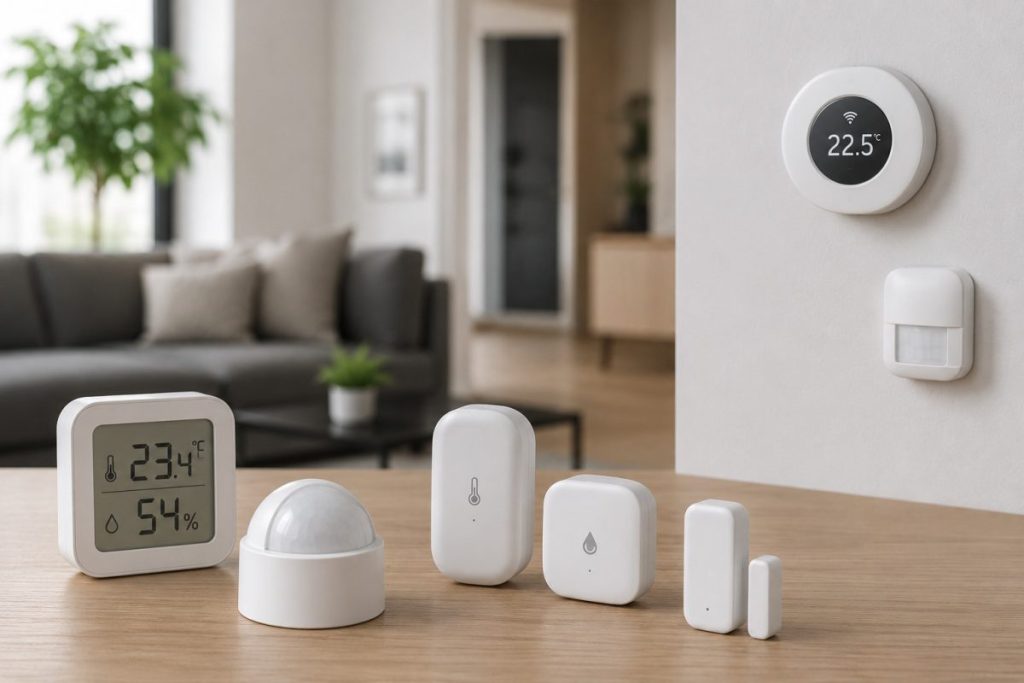

IoT sensors explained simply: every smart device you own — your thermostat, your fitness tracker, your doorbell camera, your robot vacuum — relies on at least one sensor to do its job. Sensors are the reason smart devices are smart. Without them, a connected device is just a device.
Yet most explanations of IoT sensors are written for engineers and data scientists — packed with technical terminology, circuit diagrams, and industrial use cases that have nothing to do with your living room. This guide is different. It explains what IoT sensors are, how they work, and — most usefully — where you’re already surrounded by them every day without realising it.
What Is an IoT Sensor?
An IoT sensor is a hardware component that detects something about the physical world — temperature, movement, light, sound, pressure, humidity — and converts that detection into digital data that can be transmitted, processed, and acted upon.
Think of a sensor as the nervous system of a smart device. It’s the part that perceives. Without a sensor, a device has no awareness of its environment. With one, it can detect a change and trigger a response.
The sequence is always the same:
- Detect — the sensor perceives a change in its environment
- Convert — it translates that physical change into an electrical signal
- Transmit — the signal is sent to a processor or the cloud
- Act — something happens in response
When your smart thermostat turns on the heating as you drive home, a location sensor in your phone detected your proximity, converted that to data, transmitted it to the thermostat, and triggered the heating system. Four steps, happening invisibly, in seconds.
The Most Common IoT Sensors — and Where You’ll Find Them at Home
IoT sensors are hardware components that detect changes in an environment and collect data, forming the bridge between the physical and digital worlds. They can measure variables like temperature, pressure, motion, and more, sharing information across networks to allow devices to interact and respond effectively.
Here are the sensor types most relevant to everyday home and consumer use:
1. Temperature Sensors
What they detect: Heat — measuring the thermal energy of their environment and converting it to a digital reading.
Where you’ll find them at home:
- Smart thermostats (Nest, Ecobee) — measure room temperature to control heating and cooling
- Smart refrigerators — monitor internal temperature and alert you if it rises dangerously
- Govee and Xiaomi room sensors — track temperature in specific rooms, basements, or outdoor spaces
- Baby monitors with environment tracking — alert parents if a nursery gets too hot or cold
- IoT-enabled ovens — monitor internal food temperature for precise cooking
Temperature sensors are considered the most basic sensor in the IoT ecosystem — and the most widely deployed. Every smart thermostat is fundamentally a temperature sensor connected to the internet.
The sensor behind it: Most consumer temperature sensors use a thermistor — a resistor whose electrical resistance changes predictably with temperature. The device measures that resistance and converts it to a temperature reading.
2. Motion Sensors (PIR Sensors)
What they detect: Movement — specifically, changes in infrared radiation caused by a warm body moving through their field of view.
Where you’ll find them at home:
- Smart security cameras (Ring, Nest, Wyze) — trigger recording and send phone alerts when motion is detected
- Smart doorbells — detect when someone approaches before they ring the bell
- Smart lighting — turn lights on automatically when someone enters a room
- Smart alarm systems — detect intruders in protected areas
- Robot vacuums — some models use motion sensing to detect people and avoid them
Passive Infrared (PIR) sensors detect motion by measuring changes in infrared radiation levels emitted by moving objects — equipped with a pyroelectric material that reacts to changes in infrared radiation.
The “passive” in PIR is important — the sensor doesn’t emit anything. It simply reads the infrared energy that warm objects naturally radiate. When that energy pattern changes — because something moved — the sensor triggers. This is why PIR sensors are so energy-efficient and so common in battery-powered devices.
Modern smart home cameras go beyond basic PIR, adding AI processing on top of the sensor data to distinguish between a person, a vehicle, an animal, and a false trigger like a blowing branch. The sensor detects movement — the AI decides what to do about it.
3. Humidity Sensors
What they detect: The amount of water vapour in the air, typically expressed as relative humidity (RH%).
Where you’ll find them at home:
- Smart thermostats (Ecobee includes humidity sensing) — factor humidity into comfort calculations
- Combined temperature/humidity sensors (DHT22, Govee) — popular for monitoring rooms, basements, and crawl spaces
- Smart air purifiers — adjust operation based on air moisture levels
- Weather stations — track indoor vs outdoor humidity
- Smart baby monitors — ensure nursery air quality stays in the healthy range
Humidity matters more than most people realise. High humidity encourages mould growth and makes heat feel more oppressive. Low humidity causes dry skin, static electricity, and respiratory discomfort. A $13 smart humidity sensor in a basement can alert you to moisture problems weeks before they become visible mould — one of the highest-value, lowest-cost IoT sensor applications available.
4. Light Sensors (Ambient Light Sensors)
What they detect: The intensity of light in their environment, from complete darkness to bright sunlight.
Where you’ll find them at home:
- Smart lighting systems — automatically adjust brightness based on natural light levels
- Smart TVs — adjust screen brightness based on room lighting (the same technology in your phone screen)
- Smart blinds and curtains — open and close automatically based on sunlight intensity
- Outdoor smart lights — detect sunset and sunrise to switch on and off automatically
- Security cameras — switch between colour and night vision mode based on ambient light
Light sensors enable one of the most seamless smart home automations: outdoor lights that turn on precisely at dusk and off at dawn, every day, without any schedule setting. The sensor handles it, accounting for seasonal changes in daylight automatically.
5. Proximity Sensors
What they detect: The presence or absence of an object nearby, without physical contact.
Where you’ll find them at home:
- Smart doorbells and locks — detect when someone is standing at the door
- Robot vacuums — detect obstacles and avoid collisions
- Smart garage door sensors — detect whether the door is open or closed using a magnetic proximity sensor
- Automatic faucets and soap dispensers — detect hands without touching
- Smart speakers — some models detect when you’re nearby and wake their display
Applications include automated sinks and toilet flushers, automatic door controls, energy management systems, and automated parking systems. The magnetic door sensor in your Meross garage door opener is a proximity sensor — two magnets that detect when they’re separated, signalling that the door has opened.
6. Acoustic Sensors (Microphones and Sound Detectors)
What they detect: Sound — from voice commands to glass breaking to smoke alarm tones.
Where you’ll find them at home:
- Smart speakers (Alexa, Google Nest, HomePod) — always-on microphones listening for wake words
- Smart security systems — glass break detectors that listen for the specific frequency of shattering glass
- Baby monitors — detect crying and send alerts
- Smart smoke and CO detectors — some listen for other detectors’ alarm tones and relay the alert
- Video doorbells — capture audio alongside video for two-way communication
The microphone in your Amazon Echo is an acoustic sensor operating in continuous listening mode, processing audio locally to detect its wake word (“Alexa”) before sending anything to the cloud. This local processing is what allows the device to respond without introducing significant privacy risk from constant cloud transmission.
7. Accelerometers and Gyroscopes
What they detect: Movement, orientation, and rotation — measuring acceleration forces and angular velocity.
Where you’ll find them at home (and on your body):
- Fitness trackers and smartwatches — count steps, detect sleep position, measure workout intensity
- Apple Watch fall detection — detects the sharp deceleration of a fall and the lack of movement afterwards
- Smart doorbells and cameras — detect if they’ve been knocked or tampered with
- Robot vacuums — detect when they’ve been picked up or flipped over
- Game controllers and VR headsets — track physical movement for responsive gameplay
The fall detection in the Apple Watch Series 10 is a particularly impressive application of accelerometer data combined with AI processing — it detects the specific pattern of acceleration and deceleration that characterises a fall, distinguishes it from ordinary movement, and triggers an emergency response if the wearer is unresponsive afterwards.
8. Air Quality Sensors
What they detect: Pollutants and particles in the air — including particulate matter (PM2.5), volatile organic compounds (VOCs), carbon dioxide (CO2), and carbon monoxide (CO).
Where you’ll find them at home:
- Smart air purifiers (Dyson, Levoit, Blueair) — measure air quality and adjust fan speed automatically
- Smart smoke and CO detectors (Nest Protect) — detect dangerous gases and particles
- Dedicated air quality monitors (Awair, Airthings) — provide detailed breakdowns of indoor air quality
- Some smart thermostats — factor air quality data into HVAC operation
Air quality sensors are one of the most underappreciated smart home technologies. Indoor air quality is often significantly worse than outdoor air — from cooking fumes, cleaning products, furniture off-gassing, and poor ventilation. A dedicated air quality sensor makes the invisible visible, triggering purifiers or alerting you to ventilate before levels become a health concern.
9. Water and Moisture Sensors
What they detect: The presence of water or moisture — either as a liquid (leak detection) or as humidity in materials.
Where you’ll find them at home:
- Leak detectors (Govee, Aqara, Phyn) — alert you when water is detected on the floor near appliances
- Smart washing machines — detect overflow conditions
- Soil moisture sensors — tell you when plants need watering (popular in DIY IoT projects)
- Smart irrigation controllers (Orbit B-Hyve) — measure soil moisture before deciding to water
A water leak sensor under your kitchen sink, behind your washing machine, and next to your water heater costs around $15–$35 per unit and could prevent tens of thousands of dollars in water damage. Water damage is consistently among the most expensive home insurance claims in the US — and one of the most preventable with a $20 IoT sensor.
10. GPS and Location Sensors
What they detect: Geographical position — precise location using satellite signals.
Where you’ll find them at home and beyond:
- Smart doorbells and security systems — geofencing that arms/disarms based on your location
- Smart thermostats — detect when you’ve left home and enter energy-saving mode
- Asset trackers (Apple AirTag, Tile) — locate lost keys, wallets, luggage
- Connected cars — real-time location tracking for navigation and theft recovery
- Pet trackers — monitor the location of dogs and cats that go outdoors
Location sensors power one of the most useful smart home features: geofencing. When your phone crosses a boundary you’ve defined around your home, your smart home responds — thermostat adjusts, lights turn on, security system disarms. The location sensor in your phone is doing the work; the smart home responds to it.
How Multiple Sensors Work Together
The real power of IoT sensors emerges when multiple types work in combination. A single sensor tells you one thing. Multiple sensors working together tell you something meaningful.
Example: Smart security camera A security camera combines a light sensor (to switch between day and night mode), a PIR motion sensor (to detect movement), an acoustic sensor (for two-way audio and sound detection), and an image sensor (to capture video). The interaction between these sensors — and the AI processing their combined output — is what makes it genuinely intelligent rather than just connected.
Example: Smart thermostat A smart thermostat uses a temperature sensor (to measure room temperature), a humidity sensor (to factor comfort into its calculations), an occupancy sensor (to detect whether anyone is home), and integrates with your phone’s GPS (to know when you’re approaching). No single sensor creates the smart behaviour — the combination does.
Example: Fitness tracker A smartwatch combines an accelerometer (step counting and movement), a photoplethysmography sensor (heart rate via light), a GPS sensor (outdoor workout mapping), a skin temperature sensor (health monitoring), and a gyroscope (orientation and fall detection). Together they build a comprehensive picture of your physical activity and health that no individual sensor could provide alone.
Sensors You Didn’t Know Were in Your Devices
Here’s a quick inventory of sensors hiding in devices you probably already own:
| Device | Sensors Inside |
|---|---|
| Smartphone | GPS, accelerometer, gyroscope, ambient light, proximity, microphone, barometer, camera |
| Amazon Echo | Microphone array, temperature (Echo Plus/4th gen), ultrasonic (presence detection on some models) |
| Nest Thermostat | Temperature, humidity, proximity (occupancy), ambient light |
| Ring Doorbell | PIR motion, image sensor (camera), microphone, accelerometer (tamper detection) |
| Roomba (latest) | LIDAR or camera (mapping), cliff sensors, bump sensors, optical floor tracking |
| Apple Watch | Accelerometer, gyroscope, heart rate (PPG), ECG, blood oxygen, skin temperature, GPS, ambient light |
| Smart Refrigerator | Temperature, humidity, door open/close (magnetic), internal cameras |
| Wyze Cam | Image sensor, PIR motion, microphone, ambient light |
The Future of IoT Sensors
The global IoT sensor market was valued at $23.9 billion in 2025 and is projected to reach $381.6 billion by 2034, growing at 36.1% annually. That growth is being driven by three trends directly relevant to consumers:
Miniaturisation: Sensors are getting smaller and cheaper every year. Features that required dedicated hardware five years ago — heart rate monitoring, fall detection, air quality sensing — now fit in devices small enough to wear on your wrist or clip to a wall.
Edge AI: Some major trends include 5G connectivity, AI integration, low-power sensors, and miniaturisation of sensors. AI processing is moving directly onto sensor hardware, enabling devices to interpret their own data locally rather than sending raw readings to the cloud. This improves response time, reduces data transmission, and enhances privacy.
Multi-sensor fusion: Consumer devices increasingly combine multiple sensor types to create richer, more accurate awareness. The next generation of smart home devices won’t just detect one thing — they’ll build a comprehensive picture of their environment from a combination of sensor inputs, processed by on-device AI.
Final Thoughts
IoT sensors explained in one sentence: they’re the reason smart devices are actually smart. Every automation, every alert, every personalisation in your connected home traces back to a sensor detecting something about the physical world and translating it into data.
Understanding what sensors do — and which ones are in the devices you already own — helps you make better decisions about what to buy next, how to set up automations that genuinely work, and how to get more from the smart home technology you already have.
The invisible hardware doing all the heavy lifting deserves a little credit.
Related reading: IoT in Everyday Life: What It Is and How It Works | DIY IoT Projects for Beginners: 8 Fun Builds | AIoT: What Happens When Your Smart Home Gets a Brain
Published on KontraNet IoT Hub — Your beginner-friendly guide to smart living and connected tech.
The Smart Home Setup Starter Guide for Beginners

Best Linux Distro for Old Laptops in 2026 (Your Windows 10 Replacement Guide)
12 Best Linux Productivity Tools for Intermediate Users in 2026
If you have been running Linux for a year or two, you already know the basics. You are comfortable i…