
Keys are one of those things we’ve lived with for so long that we forget how inconvenient they actually are. You lose them. You forget them. You make copies for the plumber and never get them back. You lie awake wondering if you actually locked the front door when you left for vacation.
Smart locks solve all of that — and they do it while connecting your front door to the rest of your smart home. In 2026, the technology has matured to the point where smart locks are genuinely reliable, genuinely secure, and genuinely affordable. You don’t need to be a tech enthusiast to benefit from one.
This guide covers everything a first-time buyer needs to know: how smart locks work, which type is right for your home, what to look for, and the best options available in the US right now.
How Smart Locks Actually Work
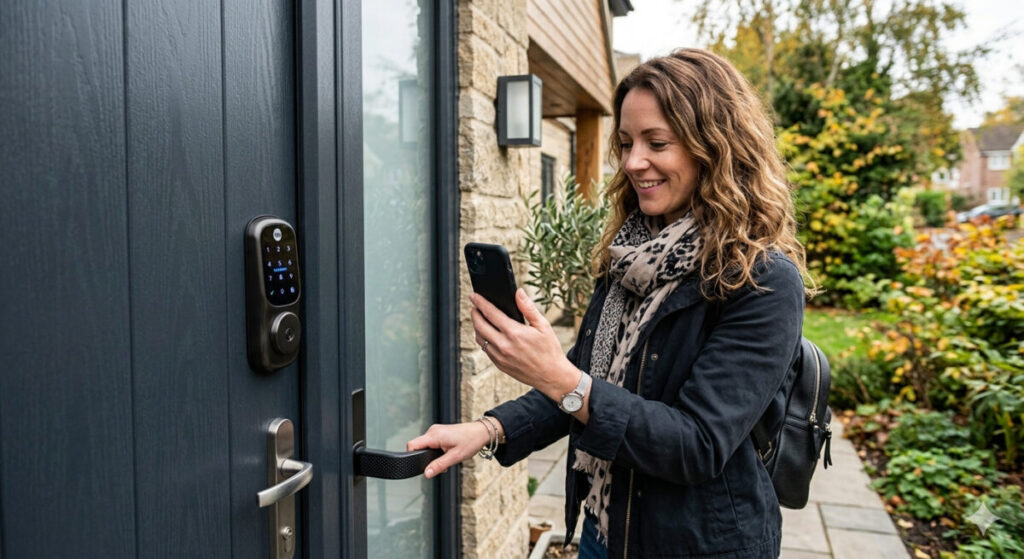
A smart lock replaces or augments your existing deadbolt with an electronic locking mechanism that can be controlled in multiple ways — a keypad, your smartphone, a key fob, your voice, or automatically when you approach the door.
Depending on the model, a smart lock connects to your home network via Wi-Fi, Bluetooth, Z-Wave, or Zigbee. This connectivity is what makes them “smart” — it allows remote access, real-time notifications, integration with other smart home devices, and the ability to create and revoke access codes instantly without a locksmith.
Most smart locks run on standard AA or AAA batteries, with a typical lifespan of six months to a year. Better models alert you when batteries are running low — before you find yourself locked out.
One important clarification: a smart lock doesn’t make your door less secure than a traditional deadbolt. A quality smart lock carries the same physical security ratings as the best mechanical locks — the difference is in how you authenticate, not in the physical bolt itself.
Types of Smart Locks: Which One Is Right for You?
Smart locks come in several distinct categories, and choosing the right type depends on your door setup, rental situation, and how you want to use it.
Deadbolt Replacement Locks
These replace your entire existing deadbolt with a new smart lock unit. They’re the most secure option because the entire locking mechanism is new, purpose-built hardware.
Best for: Homeowners who want the full smart lock experience, maximum security, and a clean installation.
Examples: Schlage Encode Plus, Nest x Yale, Yale Assure Lock 2
Pros: Highest security ratings, cleanest installation, full feature set Cons: Requires removing your existing deadbolt, more involved installation (typically 20–30 minutes)
Retrofit/Interior Add-On Locks
These attach to the inside of your existing deadbolt, converting it to smart functionality while leaving the exterior unchanged. The original keyhole remains on the outside — your existing key still works — but the interior now has a smart motor that handles locking and unlocking.
Best for: Renters who can’t replace the deadbolt, or homeowners who want smart features without changing their exterior hardware.
Examples: August Wi-Fi Smart Lock, Level Bolt
Pros: Easy installation (typically under 10 minutes, no tools required for some models), preserves existing key, landlord-friendly Cons: Slightly bulkier on the interior, existing deadbolt security is unchanged
Keypad Deadbolts
A middle ground — a full deadbolt replacement that adds a physical keypad for PIN entry, typically with Bluetooth or Wi-Fi connectivity for smart features. Many homeowners prefer these because they work reliably even when your phone is dead or Wi-Fi is down.
Best for: Families, households with children, anyone who wants a backup entry method that doesn’t rely on a phone.
Examples: Schlage Encode Plus, Kwikset SmartCode 913, Wyze Lock Keypad
Pros: Works without a phone, highly reliable, great for giving access to multiple family members Cons: PIN codes can be shoulder-surfed if you’re not careful
Smart Lock Connectivity: Wi-Fi vs Bluetooth vs Z-Wave
The connectivity type affects what your smart lock can do — particularly whether you can control it remotely.
Wi-Fi locks connect directly to your home network, enabling remote access from anywhere. Lock and unlock from your phone in another state. Get real-time notifications when the door is unlocked. Check the status at any time. Wi-Fi is the most capable option but uses more battery.
Bluetooth locks connect to your phone when you’re nearby — typically within 30 feet. Auto-unlock as you approach works via Bluetooth. Some features (like remote locking) require a Wi-Fi bridge accessory. Battery life is significantly better than Wi-Fi.
Z-Wave / Zigbee locks use smart home mesh protocols rather than Wi-Fi. They typically pair with a smart home hub (SmartThings, Home Assistant) and are the most reliable option for whole-home automation — but require a compatible hub to work.
The practical recommendation for most people: A Wi-Fi lock covers the broadest set of use cases with no additional hardware. If you already run Home Assistant or SmartThings, Z-Wave integration is worth considering for reliability and automation depth.
Smart Lock Features Worth Paying For
Not all smart locks are equal. Here are the features that genuinely matter in daily use:
Auto-lock: Automatically locks the door after a set time period. Essential — the most common scenario smart locks solve is leaving the door unlocked by accident. Set it to auto-lock after 5 minutes and never worry about it again.
Auto-unlock: Uses your phone’s location to detect when you’re approaching and unlocks automatically. Controversial among security researchers (your phone being near the door is not as secure as a PIN), but enormously convenient for hands-full arrivals. Most good locks let you enable or disable this independently.
Access codes: Create unique PIN codes for different people — family members, house cleaners, dog walkers, Airbnb guests. Revoke them instantly from your phone. Set time-limited codes that only work during specific hours. This feature alone makes smart locks transformative for anyone who regularly lets people into their home.
Activity log: See a timestamped log of every lock and unlock event. Know when your kids got home from school. Check whether the housekeeper came on Tuesday. Verify that the door was locked when you left. Available on most Wi-Fi locks with a companion app.
Remote lock/unlock: Lock or unlock from anywhere via the app. Useful for letting in a delivery driver, a family member who forgot their key, or a dog walker you trust. Also useful for that 3am “did I lock the door?” moment — check and lock remotely without getting out of bed.
Voice control: Compatible locks work with Alexa or Google Home for voice commands. “Alexa, lock the front door” is satisfying every time. Note: most platforms deliberately don’t support unlocking by voice alone for security reasons — locking is voice-enabled, unlocking typically requires a PIN or app interaction.
Apple Home Key / Digital keys: The latest generation of smart locks supports Apple Home Key (on iPhone and Apple Watch) and Google’s digital key standard — allowing you to unlock with a tap of your phone or watch, even if the battery is dead (via NFC). This is the future of key management and is worth looking for in 2026 purchases.
The Best Smart Locks Available in the US in 2026
Schlage Encode Plus — Best Overall (~$249)
The Schlage Encode Plus is the consensus best smart lock for US homeowners in 2026, and it’s easy to understand why. It carries an ANSI Grade 1 security rating — the highest residential standard, used in commercial buildings — making it physically more resistant to forced entry than most deadbolts, smart or otherwise.
Built-in Wi-Fi means no bridge or hub required. It supports Apple Home Key, Alexa, and Google Home. The touchscreen keypad is responsive and reliable in all weather conditions. Up to 100 access codes. Auto-lock standard. Battery life around 6 months.
During Hurricane Ian, when a neighbourhood lost power for 12 hours and cell towers went down, the Schlage Encode Plus provided reliable entry through its physical keypad — a real-world test of resilience that matters in a security device.
Best for: Homeowners who want the most secure, capable, no-compromises smart lock available.
Nest x Yale Smart Lock — Best for Google Home Users (~$279)
The Nest x Yale tops 2026 smart lock rankings for its keyless unlocking and remote capabilities. It’s a collaboration between Google’s Nest and the 180-year-old Yale lock company — combining smart home integration depth with genuine hardware pedigree.
Uniquely, the Nest x Yale is designed as a fully keyless solution — there’s no physical keyhole on the exterior at all. Entry is via PIN only. This eliminates the traditional deadbolt’s biggest vulnerability: the keyhole that can be picked or bumped. For Google Home households, the integration is seamless — it appears in the Google Home app alongside all other devices and supports all Google Assistant commands natively.
Best for: Google Home households, users who want a genuinely keyless setup.
August Wi-Fi Smart Lock — Best for Renters (~$149)
The August Wi-Fi Smart Lock is the go-to choice for anyone who can’t or doesn’t want to replace their existing deadbolt. It attaches to the interior thumb turn of your existing lock in about five minutes, adds Wi-Fi connectivity, auto-lock, auto-unlock, and app control — while leaving the exterior completely unchanged.
Your existing key still works. Your landlord will never know you’ve changed anything. And you get the full smart lock experience in the meantime. When you move out, uninstall it in five minutes and take it with you.
Best for: Renters, anyone who wants smart features without changing exterior hardware.
Yale Assure Lock 2 — Best Value (~$179)
The Yale Assure Lock 2 is the sweet spot for homeowners who want reliable smart lock functionality without the premium price tag of the Schlage or Nest x Yale. It supports Alexa, Google Home, Apple HomeKit, and SmartThings. The keypad is sturdy and weather-resistant. It comes in Z-Wave, Zigbee, and Wi-Fi variants — useful flexibility depending on your existing smart home setup.
Best for: Budget-conscious homeowners who want broad ecosystem compatibility.
Lockly Visage Zeno — Best for Tech Enthusiasts (~$399)
The Lockly Visage Zeno is one of the first smart locks to offer integrated facial recognition for hands-free entry, using dual infrared cameras to identify authorised users. Walk up to the door, it recognises your face, and unlocks automatically — no phone, no PIN, no key.
It also supports Apple Home Key, fingerprint entry, PIN, and app control — meaning it has more entry methods than any other consumer smart lock currently available. The price reflects it, but for households that want bleeding-edge convenience, nothing else comes close.
Best for: Tech enthusiasts, households with elderly or mobility-impaired users who benefit from hands-free entry.
Wyze Lock Bolt — Best Budget Pick (~$49)
For anyone who wants to try a smart lock without a significant investment, the Wyze Lock Bolt delivers surprising capability at $49. Fingerprint entry (up to 50 fingerprints), auto-lock, Bluetooth control via the Wyze app, and a backup keypad — all for the price of a dinner out.
The trade-off: it’s Bluetooth only (no Wi-Fi), so no remote access from outside your home. But for straightforward smart entry with the Wyze ecosystem, it’s a remarkable value.
Best for: Budget buyers, anyone wanting to test smart lock technology before committing to a premium model.
Smart Locks and Your Smart Home: How They Connect
A smart lock becomes significantly more powerful when integrated with the rest of your smart home. Here’s what becomes possible:
Arrival automations: When the front door unlocks, trigger a welcome routine — lights turn on, thermostat adjusts, music starts playing. Most platforms (Alexa routines, Google Home, Home Assistant) support door lock state as an automation trigger.
Departure automations: When you lock the door and leave, trigger a “goodbye” routine — all lights off, thermostat set back, security cameras activated. One action secures the whole house.
Smart doorbell integration: Pair your smart lock with a Ring or Nest doorbell and you can see who’s at the door on your phone and unlock remotely with a single tap — without touching two separate apps.
Guest access coordination: For Airbnb hosts or anyone regularly having visitors, combining a smart lock with a smart thermostat and smart lights enables a complete guest arrival experience — a unique code lets guests in, triggers the lights, and sets the temperature, all automatically.
Security system integration: Many smart locks integrate with Ring Alarm, SimpliSafe, and ADT systems — so the lock state feeds directly into your security system’s awareness of whether the home is secured.
Installation: Is It a DIY Job?
For most smart locks, yes — installation is a straightforward DIY project.
Deadbolt replacement locks require removing your existing deadbolt and installing the new unit. This typically takes 20–30 minutes with a Phillips screwdriver. The biggest variable is whether your door is pre-drilled for a standard deadbolt (almost all US exterior doors are). Every major smart lock includes a detailed instruction manual, and YouTube has installation walkthroughs for every popular model.
Retrofit locks like the August are even simpler — they clamp onto your existing thumb turn with an adapter. Most users complete installation in under 10 minutes with no tools at all.
What can go wrong: The most common installation issue is door alignment — if your deadbolt is stiff or misaligned to begin with, a smart lock’s auto-lock motor may struggle. Fix the underlying door alignment first.
One thing to check before buying: smart locks require a single-cylinder deadbolt (one that turns from the inside without a key). Double-cylinder deadbolts — which require a key on both sides — are not compatible with most smart locks.
Smart Lock Security: Are They Actually Safe?
This is the question every buyer rightly asks. The answer is: yes, quality smart locks are as secure as — and in some ways more secure than — traditional deadbolts.
Keyless locks use Bluetooth and Wi-Fi only — there’s no external keyhole to pick. Keypad locks add a physical PIN option that works even when your phone dies or Wi-Fi drops.
The security considerations unique to smart locks:
Use strong, unique access codes. Don’t use birthdays, sequential numbers, or codes you use elsewhere. Change codes when housekeepers or contractors no longer need access.
Keep firmware updated. Smart lock manufacturers patch security vulnerabilities through firmware updates. Enable automatic updates where available.
Enable two-factor authentication on the companion app. If someone gets your app login, 2FA prevents them from using it to unlock your door remotely.
Use a strong Wi-Fi password on your home network. A smart lock is only as secure as the network it sits on.
Physical security still matters. A Grade 1 smart lock on a flimsy door frame provides less security than a Grade 2 lock on a properly reinforced frame. If security is a priority, consider door frame reinforcement alongside a smart lock upgrade.
Quick Comparison: Best Smart Locks 2026
| Lock | Price | Connectivity | Best For | Apple HomeKit |
|---|---|---|---|---|
| Schlage Encode Plus | $249 | Wi-Fi | Best overall | ✅ |
| Nest x Yale | $279 | Wi-Fi | Google Home users | ❌ |
| August Wi-Fi | $149 | Wi-Fi | Renters | ✅ |
| Yale Assure Lock 2 | $179 | Wi-Fi/Z-Wave/Zigbee | Best value | ✅ |
| Lockly Visage Zeno | $399 | Wi-Fi | Tech enthusiasts | ✅ |
| Wyze Lock Bolt | $49 | Bluetooth | Budget buyers | ❌ |
Final Thoughts
A smart lock is one of those upgrades that, once you have it, you genuinely can’t imagine going back. The combination of auto-lock peace of mind, access code flexibility, arrival automations, and remote control from your phone addresses real, daily frustrations that a traditional deadbolt simply can’t.
For most US homeowners, the Schlage Encode Plus is the no-regrets choice — maximum security, broad compatibility, and a physical keypad backup that works in any situation. Renters should look at the August Wi-Fi Smart Lock. Budget buyers will be pleasantly surprised by the Wyze Lock Bolt.
Whichever you choose, the installation is approachable, the daily benefits are immediate, and the peace of mind of knowing your front door is locked — and being able to verify it from anywhere — is quietly one of the best things a smart home can give you.
Related reading: Best Smart Home Gadgets Under $50 | How to Secure Smart Home Devices | Voice Assistant vs Smart Home Hub: Which Do You Need?
Published on KontraNet IoT Hub — Your beginner-friendly guide to smart living and connected tech.
- AI Home Companion Robots Are Here: What CES 2026 Revealed About Your Future Living Room
- On-Device AI in Smart Homes: Why 2026 Is the Year of Local Intelligence
- Home Assistant for Beginners: Your First Step Away from Big Tech’s Smart Home
- What Data Do Smart Home Devices Collect? (And What Happens to It)
- Digital Twins Explained: The Technology That Creates a Living Copy of Everything