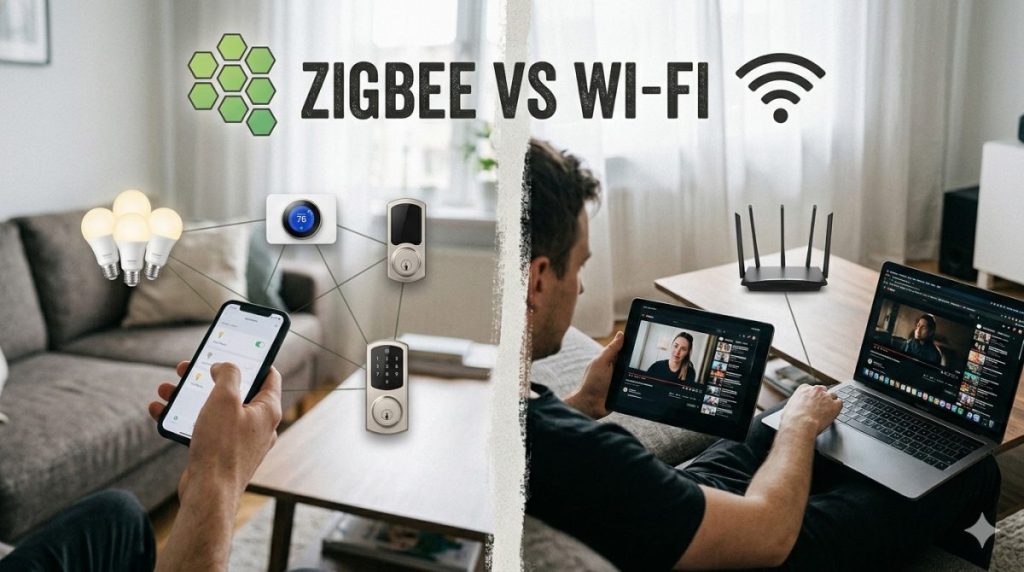

Zigbee vs Wi-Fi – If you’re building a smart home, one of the first decisions you’ll run into is choosing how your devices should connect.
Most beginners start with Wi-Fi because it’s familiar. But as soon as you add more devices, you’ll start hearing about Zigbee — and that’s where things get confusing.
So which one is actually better?
The truth is, there’s no one-size-fits-all answer. Both Zigbee and Wi-Fi have strengths and weaknesses, and the right choice depends on what kind of smart home you want to build.
In this guide, we’ll break it down in simple terms, compare real-world performance, and help you decide which option makes the most sense for your setup.
What Is Wi-Fi in Smart Homes?
Wi-Fi is the same wireless technology you use for your phone, laptop, and internet connection.
In smart homes, Wi-Fi devices connect directly to your router.
Examples of Wi-Fi Smart Devices
- Smart plugs
- Smart cameras
- Smart TVs
- Smart speakers
How It Works
Each device:
- connects directly to your network
- communicates via the internet
- is controlled through an app
What Is Zigbee?
Zigbee is a wireless communication protocol designed specifically for smart devices.
Unlike Wi-Fi, it doesn’t connect devices directly to your router.
Instead, it uses a mesh network.
What That Means
Devices communicate with each other, not just a central hub.
So:
- one device passes data to another
- the signal extends across your home
Examples of Zigbee Devices
- motion sensors
- smart bulbs
- door sensors
- switches
Zigbee vs Wi-Fi: Key Differences
Let’s break down the most important differences.
1. Power Consumption
Zigbee:
- extremely low power
- ideal for battery-powered devices
Wi-Fi:
- higher power usage
- drains batteries faster
👉 Winner: Zigbee
2. Range and Coverage
Zigbee:
- uses mesh networking
- range increases as you add devices
Wi-Fi:
- depends on router strength
- weak signal in larger homes
👉 Winner: Zigbee (for larger setups)
3. Speed and Bandwidth
Zigbee:
- low data rate
- not suitable for video or heavy data
Wi-Fi:
- high speed
- supports streaming and cameras
👉 Winner: Wi-Fi
4. Setup Complexity
Zigbee:
- requires a hub
- slightly more complex setup
Wi-Fi:
- connects directly to router
- very easy to install
👉 Winner: Wi-Fi
5. Network Stability
Zigbee:
- less interference
- stable as network grows
Wi-Fi:
- can get congested with many devices
👉 Winner: Zigbee
6. Device Limitations
Zigbee:
- supports many devices efficiently
- great for scaling
Wi-Fi:
- routers can struggle with too many connections
👉 Winner: Zigbee
Comparison Table
| Feature | Zigbee | Wi-Fi |
|---|---|---|
| Power Usage | Very Low | High |
| Range | Expands with mesh | Limited by router |
| Speed | Low | High |
| Setup | Requires hub | Plug-and-play |
| Stability | High (large networks) | Can degrade |
| Best For | Sensors, automation | Cameras, streaming |
When to Choose Zigbee
Zigbee is the better choice if:
- you plan to build a large smart home
- you use many battery-powered devices
- you want a stable, scalable system
- you care about long-term efficiency
Example Scenario
A home with:
- motion sensors
- door sensors
- smart lighting
👉 Zigbee handles this efficiently with minimal power usage.
When to Choose Wi-Fi
Wi-Fi is better if:
- you want a simple setup
- you have only a few devices
- you use cameras or high-data devices
- you don’t want a hub
Example Scenario
A small apartment with:
- smart plug
- smart speaker
- camera
👉 Wi-Fi is more than enough.
Can You Use Both? (Best Approach)
Yes — and this is actually the smartest solution.
Most modern smart homes use a hybrid setup.
Example:
- Zigbee for:
- sensors
- lights
- automation
- Wi-Fi for:
- cameras
- streaming devices
- voice assistants
👉 This gives you:
- efficiency + performance
- flexibility
Common Mistakes to Avoid
❌ Choosing Wi-Fi for Everything
This leads to:
- network congestion
- unstable connections
❌ Ignoring the Need for a Hub
Zigbee requires a hub — skipping this leads to confusion.
❌ Mixing Too Many Ecosystems
Stick to compatible devices to avoid integration issues.
Real-World Performance (What Actually Matters)
In real homes:
- Zigbee shines in automation
- Wi-Fi shines in media and control
The biggest difference shows when:
- you scale beyond 5–10 devices
At that point:
- Wi-Fi starts to struggle
- Zigbee becomes more reliable
Future-Proofing Your Smart Home
If you’re planning long-term:
- Zigbee is better for scaling
- Wi-Fi is better for simplicity
But the future is moving toward:
- better interoperability
- unified smart home standards
So choosing a flexible setup is key.
Quick Overview: Zigbee vs Wi-Fi
- Zigbee is low-power and ideal for large smart home networks
- Wi-Fi is faster and easier to set up
- Zigbee devices last longer on battery
- Wi-Fi is better for high-bandwidth devices like cameras
- The best choice depends on your setup and goals
FAQ
Is Zigbee better than Wi-Fi?
Not universally. Zigbee is better for low-power, scalable networks, while Wi-Fi is better for speed and simplicity.
Do I need a hub for Zigbee?
Yes, most Zigbee devices require a hub to function.
Can Zigbee devices work without internet?
Yes, many Zigbee systems can operate locally without internet access.
Why is Zigbee more reliable?
Because it uses a mesh network, devices support each other instead of relying on a single connection point.
Is Wi-Fi good enough for smart homes?
Yes, especially for smaller setups or high-bandwidth devices.
Choosing the Right Foundation for Your Smart Home
Zigbee and Wi-Fi are not competitors in the way many people think. They solve different problems.
If you want something simple and quick, Wi-Fi is a great starting point. But if you’re building a more advanced, scalable smart home, Zigbee offers clear advantages.
In reality, the best smart homes don’t choose one — they combine both strategically.
Start with what you need today, but think about how your system might grow tomorrow. That’s the difference between a smart setup and a frustrating one.
- Matter 1.4 vs Zigbee vs Z-Wave: Best Smart Home Protocol for US Homes in 2026
 By KontraNet IoT Hub | Last Updated: June 3, 2026 | Reading time: 11 min Quick Pick for US Homeowners in 2026 Use this table if you just need the answer fast: Your Situation Best Protocol in 2026 Why It Wins for US Homes Apple + Google + Alexa household Matter 1.4 over Thread All 3 ecosystems control the…
 - Best Cellular IoT Data Plans for US Makers in 2026: Hologram vs Twilio vs Soracom TestedBy KontraNet IoT Hub | Last Updated: June 1, 2026 | Reading time: 9 min Quick Pick for US Makers in 2026 Use this table if you just need the answer fast: Your Project Type Best IoT SIM in 2026 Why It Wins for US Makers 1-10 devices, prototyping Hologram IoT SIM Free 1MB/month per device forever. Pay-as-you-go after.…
- Smart Home Energy Saving: How to Cut Your Electricity Bill in 2026Smart home energy saving is one of the most effective ways to cut your electricity costs in 2026 — and the results are measurable. The average American household spends between $1,500 and $2,000 on electricity every year. Most of that money goes to heating, cooling, and appliances running longer than they need to — and…
- Smart Locks & Keyless Entry: The Complete Beginner’s Guide for 2026Keys are one of those things we’ve lived with for so long that we forget how inconvenient they actually are. You lose them. You forget them. You make copies for the plumber and never get them back. You lie awake wondering if you actually locked the front door when you left for vacation. Smart locks…
- Best Linux Distros for IoT in 2026: Pi 5, RISC-V, and Edge AI TestedLinux powers 80% of Internet of Things devices shipped in the US, from your Home Assistant hub to industrial sensors at Ford plants. With Raspberry Pi 5, cheap RISC-V boards, and Matter 1.4 changing the game in 2026, picking the right distro matters more than ever. We tested five of the best Linux distros for…




Zigbee vs Wi-Fi explained for smart homes
The Smart Home Setup Starter Guide for Beginners
Zigbee vs Wi-Fi and other smart home related content.