
Smart lighting is often the first step into building a smart home — but many beginners get stuck on one question:
Do you really need a hub to get started?
The short answer is no.
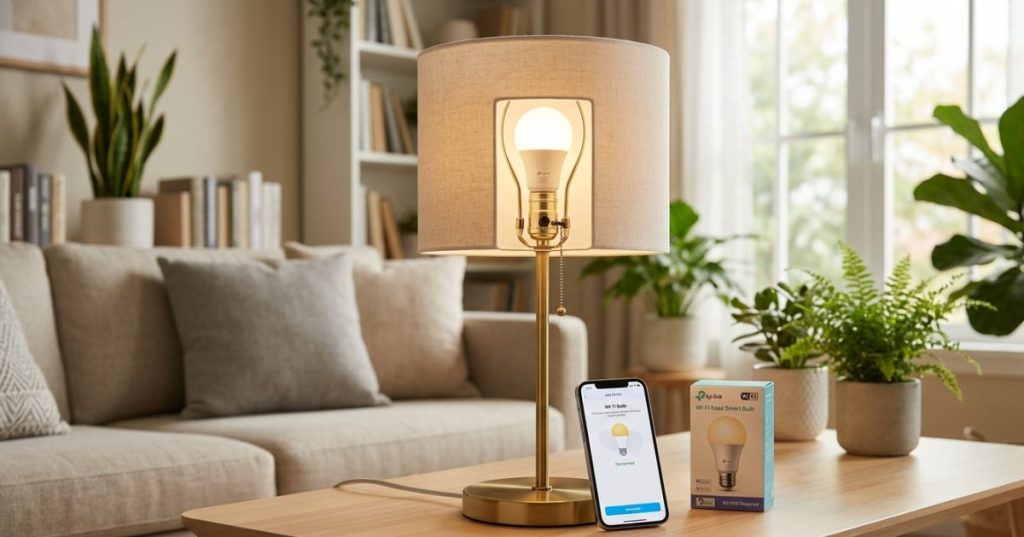
While some smart lighting systems require a hub, many modern smart bulbs connect directly to your Wi-Fi network. That means you can control your lights from your phone, set schedules, and automate your home — without any extra hardware.
In this guide, you’ll learn exactly how to set up smart lights without a hub, what to look for when choosing bulbs, and how to avoid the most common mistakes.
Quick Overview
- You can set up smart lights without a hub using Wi-Fi bulbs
- Setup usually takes less than 10 minutes
- No technical knowledge is required
- Ideal for beginners starting a smart home
What Does “Without a Hub” Actually Mean?
A hub is a central device that connects and manages smart home devices.
Examples:
- Zigbee hubs
- smart home bridges
When you use smart lights without a hub, the bulbs:
- connect directly to your Wi-Fi router
- communicate through a mobile app
- don’t rely on a separate control device
👉 This makes setup much simpler.
What You Need Before Setup
Before getting started, make sure you have the following:
✔ Wi-Fi Smart Bulbs
Look for bulbs that:
- support direct Wi-Fi connection
- come with a dedicated mobile app
- are compatible with your phone
✔ A 2.4 GHz Wi-Fi Network
This is very important.
Most smart bulbs:
- do NOT support 5 GHz networks
👉 If your router uses both, make sure 2.4 GHz is enabled.
✔ A Smartphone
You’ll need:
- Android or iOS
- the app for your smart bulb
✔ A Standard Light Fixture
Any regular lamp or ceiling socket will work.
Step-by-Step Setup Guide
Let’s go through the full process.
Step 1: Install the Bulb
Screw the smart bulb into your light fixture and turn it on.
Most bulbs will:
- start blinking
- enter pairing mode automatically
Step 2: Download the App
Install the app recommended by the manufacturer.
Create an account if required.
Step 3: Connect to Wi-Fi
Inside the app:
- tap “Add Device”
- select “Lighting” or “Smart Bulb”
- enter your Wi-Fi credentials
Make sure:
- your phone is connected to the same network
Step 4: Pair the Bulb
The app will:
- detect the bulb
- connect it to your network
This usually takes less than a minute.
Step 5: Name Your Light
Choose a clear name like:
- “Bedroom Light”
- “Living Room Lamp”
This helps with automation later.
Step 6: Test the Controls
Try:
- turning the light on/off
- adjusting brightness
- changing color (if supported)
If everything works, you’re done.
What You Can Do Without a Hub
Even without a hub, smart lights offer powerful features.
Remote Control
Turn lights on or off from anywhere using your phone.
Scheduling
Set lights to:
- turn on at sunset
- turn off at night
Brightness and Color Control
Adjust lighting to match:
- mood
- time of day
Basic Automation
Some apps allow simple rules like:
- lights turn off after a set time
Advantages of Using Smart Lights Without a Hub
✔ Easy Setup
No extra hardware required.
✔ Lower Cost
You only pay for the bulbs.
✔ Beginner-Friendly
Perfect for first-time users.
✔ Flexible
You can start small and expand later.
Limitations You Should Know
❌ Higher Power Usage
Wi-Fi bulbs consume more energy than Zigbee alternatives.
❌ Network Load
Each bulb connects to your router.
Too many devices can:
- slow down your network
- cause instability
❌ Limited Advanced Automation
Without a hub, automation is more basic.
Wi-Fi vs Hub-Based Lighting (Quick Comparison)
| Feature | Without Hub (Wi-Fi) | With Hub (Zigbee) |
|---|---|---|
| Setup | Very easy | Moderate |
| Cost | Lower | Higher |
| Power usage | Higher | Lower |
| Scalability | Limited | Excellent |
| Automation | Basic | Advanced |
Common Mistakes to Avoid
❌ Using the Wrong Wi-Fi Network
Make sure you use:
👉 2.4 GHz, not 5 GHz
❌ Skipping Device Naming
Avoid names like “Light 1”
Use clear labels instead.
❌ Adding Too Many Devices Too Fast
Start small to avoid network issues.
❌ Ignoring App Permissions
Some features require:
- location access
- background activity
When Should You Use a Hub Instead?
At some point, you may want to upgrade.
Consider a hub if:
- you have more than 10–15 devices
- you want advanced automation
- you use sensors and smart switches
- you want better reliability
👉 This is where systems like Zigbee become more useful.
Simple Automation Ideas to Try
Evening Lighting
Lights turn on automatically at sunset.
Night Mode
All lights turn off at a specific time.
Wake-Up Lighting
Lights gradually brighten in the morning.
FAQ
Do smart lights always need a hub?
No, many modern smart bulbs work directly over Wi-Fi without a hub.
Are hub-free smart lights reliable?
Yes, for small setups. Larger systems may benefit from a hub.
Can I control smart lights when I’m not home?
Yes, as long as they are connected to the internet.
How many smart bulbs can I use without a hub?
Typically 5–10 devices work well on most home networks.
Is Zigbee better than Wi-Fi for lighting?
Zigbee is more efficient and scalable, but Wi-Fi is simpler for beginners.
The Easiest Way to Start Your Smart Home
Setting up smart lights without a hub is one of the simplest ways to enter the world of smart homes. It requires minimal effort, low cost, and delivers immediate results.
For beginners, it’s the perfect starting point. And once you’re comfortable, you can always expand into more advanced systems.
The key is to start small, learn how automation works, and build from there.

Linux and the Internet of Things: Powering the Smart Future
- Matter 1.4 vs Zigbee vs Z-Wave: Best Smart Home Protocol for US Homes in 2026
 By KontraNet IoT Hub | Last Updated: June 3, 2026 | Reading time: 11 min Quick Pick for US Homeowners in 2026 Use this table if you just need the answer fast: Your Situation Best Protocol in 2026 Why It Wins for US Homes Apple + Google + Alexa household Matter 1.4 over Thread All 3 ecosystems control the…
 - Best Cellular IoT Data Plans for US Makers in 2026: Hologram vs Twilio vs Soracom TestedBy KontraNet IoT Hub | Last Updated: June 1, 2026 | Reading time: 9 min Quick Pick for US Makers in 2026 Use this table if you just need the answer fast: Your Project Type Best IoT SIM in 2026 Why It Wins for US Makers 1-10 devices, prototyping Hologram IoT SIM Free 1MB/month per device forever. Pay-as-you-go after.…
- Smart Home Energy Saving: How to Cut Your Electricity Bill in 2026Smart home energy saving is one of the most effective ways to cut your electricity costs in 2026 — and the results are measurable. The average American household spends between $1,500 and $2,000 on electricity every year. Most of that money goes to heating, cooling, and appliances running longer than they need to — and…
- Smart Locks & Keyless Entry: The Complete Beginner’s Guide for 2026Keys are one of those things we’ve lived with for so long that we forget how inconvenient they actually are. You lose them. You forget them. You make copies for the plumber and never get them back. You lie awake wondering if you actually locked the front door when you left for vacation. Smart locks…
- Best Linux Distros for IoT in 2026: Pi 5, RISC-V, and Edge AI TestedLinux powers 80% of Internet of Things devices shipped in the US, from your Home Assistant hub to industrial sensors at Ford plants. With Raspberry Pi 5, cheap RISC-V boards, and Matter 1.4 changing the game in 2026, picking the right distro matters more than ever. We tested five of the best Linux distros for…